 ScaleDM
Turn Instagram and Facebook comments into DMs
When someone comments a keyword you choose, ScaleDM sends them a private reply with your link. Set it up for Instagram posts and Reels or Facebook Page posts.
- Accounts
- Instagram Business or Creator · Facebook Pages
- Triggers
- A keyword or any comment
- Cost
- Free · Meta messaging limits apply
What can trigger an automated DM?
See the audience action that starts each reply.
Post comments
Instagram posts and Reels · Facebook Page posts
Someone comments GUIDESend the guide privatelyLive comments
Instagram Live · Facebook Live
A viewer comments MENUSend the menu privatelyStory replies and reactions
Instagram Stories · Emoji reactions are optional
Someone reacts to a StorySend a thank-you DMMessages and shares
DM keywords on both platforms · Post and Reel shares on Instagram
Someone DMs HOURSSend your opening hours
Set up a comment-to-DM automation
Connect Instagram or a Facebook Page first.
Choose the post
Use one post, all posts, or your next post.
Choose the trigger
Match a keyword or reply to every comment.
Write the DM
Add your message and a link button, image or carousel.
Preview and publish
Check the reply. Edit or pause anytime.
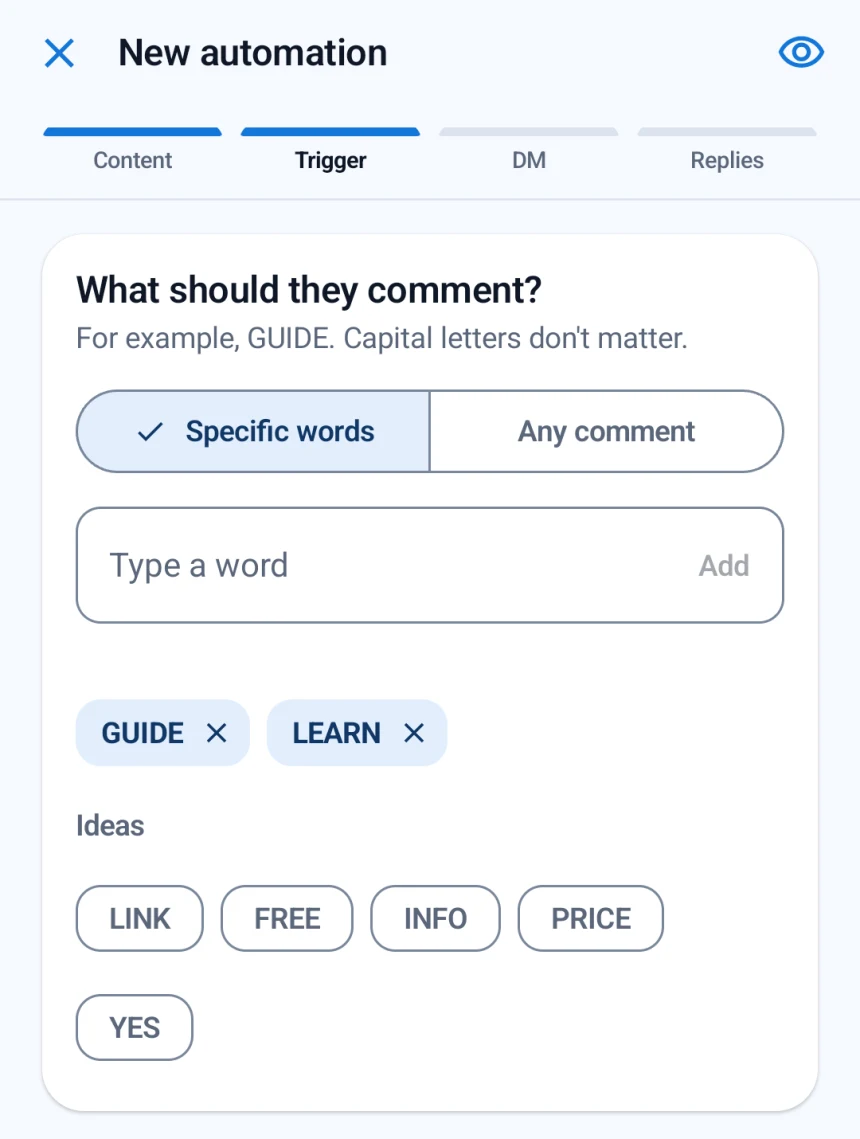
In Trigger, choose Specific words to match keywords, or Any comment to reply to every eligible comment.
View full-size screenshotTrack DMs sent and link clicks
Compare posts and keywords using delivery and click counts.
- Pause, edit or duplicate from the automations list.


How ScaleDM connects to Meta
Official Meta tools
ScaleDM is a Meta Tech Provider.
One initial private reply
Instagram allows one initial private reply per eligible comment.
You control access
Approve access on Instagram or Facebook. ScaleDM never asks for your password.
Tools for managing post comments
Comment Rewind
Catch up once on eligible unanswered Instagram comments from the past seven days.
Earlier commentSend a private replyAutomatic comment likes
Turn on Like their comment if your Meta permissions allow it.
Automation repliesLike the commentTracked link buttons
See clicks in your automation results.
Here’s the booking page.Book a spot
Good to know
- Account type. Use an Instagram Business or Creator account, or a Facebook Page.
- Keyword matching. “Link please!” matches LINK. Capitalization does not matter.
Comment to DM in practice
- Post caption
- Comment SIZE for our fit guide.
- Automated DM
- Here’s the fit guide for this drop.
- Link button
- Find my size
Questions people ask
Does it work on Reels?
Yes. Instagram Reels and posts use the same comment trigger.
What kind of account do I need?
An Instagram Business or Creator account, or a Facebook Page.
Is it free?
Yes. Meta’s messaging limits apply. An optional No Ads plan removes ads from link preview pages.
Can people tap a link right in the DM?
Yes. Add a link button to send people to your destination and track clicks.
Send your first automated reply
Start with one post, one keyword and a link worth sending.